
Smarty supports integration with various services for sending SMS messages to users. SMS is sent by the system when using widgets integrated with the site (for example, during subscriber registration) or to send mass messages to customers. SMS gateway integration settings are set by variables in the configuration file /etc/microimpuls/smarty/smarty.py:
SMS_BACKEND— The SMS gateway used to send messages. The module that implements interaction with the gateway should be located in the Smarty directory in the foldersms/backends/.SMS_ATTEMPTS— The number of maximum attempts to send a message after which it is considered unsuccessful.
As well as additional parameters, which may differ depending on the configurable SMS gateway, they are described in more detail below.
After changing the configuration file, reboot uwsgi to take effect.
Logs about operations related to sending SMS messages are stored in a file /var/log/microimpuls/smarty/smarty_sms.log
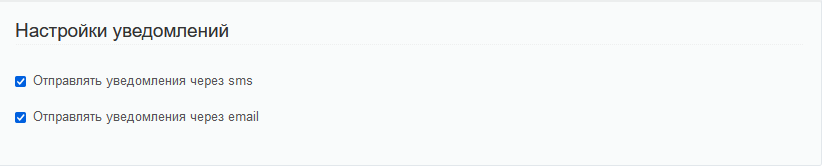
Attention! Sending an SMS message via the screen «Subscribers» — «Messages and commands» depends on the account notification settings.
SMS-gateway smsc.ru
| Sending SMS with code and password during registration | Yes |
| Sending an SMS with a code to confirm the number during registration | Yes |
| Sending a confirmation call during registration | Yes |
| Sending a confirmation code in the incoming call number | Yes |
| Sending one-time passwords during authorization | Yes |
| Massive SMS mailing | Yes |
Set up integration
To start using the service for sending SMS messages smsc.ru, you must specify the following parameters in the configuration file:
- SMS_BACKEND =
'sms.backends.smscru.SMSCBackend' - SMSC_LOGIN — User name in the service smsc.ru
- SMSC_PASSWORD — Password in smsc.ru
- SMSC_SENDER — The name of the sender, which will be displayed in SMS sent through the service smsc.ru
SMS gateway mobipace.com
| Sending SMS with code and password during registration | Yes |
| Sending an SMS with a code to confirm the number during registration | No |
| Sending a confirmation call during registration | No |
| Sending one-time passwords during authorization | No |
| Massive SMS mailing | Yes |
Set up integration
To start using the service for sending SMS messages mobipace.com, you must specify the following parameters in the configuration file:
- SMS_BACKEND =
'sms.backends.mobipace.MobipaceBackend' - MOBIPACE_LOGIN — Username in the mobipace service
- MOBIPACE_PASSWORD — Password on mobipace
- MOBIPACE_SENDER — The name of the sender, which will be displayed in SMS sent through the service mobipace
SMS gateway pulseem.co.il
| Sending SMS with code and password during registration | Yes |
| Sending an SMS with a code to confirm the number during registration | Yes |
| Sending a confirmation call during registration | No |
| Sending one-time passwords during authorization | No |
| Massive SMS mailing | Yes |
Set up integration
To start using the service for sending SMS messages pulseem.co.il, you must specify the following parameters in the configuration file:
- SMS_BACKEND =
'sms.backends.pulseem.PulseemBackend' - PULSEEM_APIKEY —: PULSEEM API Key
- PULSEEM_SENDER_NAME — The name of the sender, which will be displayed in SMS sent through the service pulseem
SMS gateway sms-assistent.by
| Sending SMS with code and password during registration | Yes |
| Sending an SMS with a code to confirm the number during registration | Yes |
| Sending a confirmation call during registration | No |
| Sending one-time passwords during authorization | No |
| Massive SMS mailing | Yes |
Set up integration
To start using the service for sending SMS messages sms-assistent.by, you must specify the following parameters in the configuration file:
- SMS_BACKEND =
'sms.backends.sms-assistent.SmsAssistentBackend' - SMS_ASSIST_USERNAME — Username in the SMS-assistent service
- SMS_ASSIST_PASSWORD — Password in SMS-assistent
- SMS_ASISST_SENDER_NAME — The name of the sender that will be displayed in the SMS sent through the sms-assistent service (must match the one that is registered in the account)
Twilio SMS gateway
| Sending SMS with code and password during registration | Yes |
| Sending an SMS with a code to confirm the number during registration | Yes |
| Sending a confirmation call during registration | No |
| Sending a confirmation code in the incoming call number | No |
| Sending one-time passwords during authorization | No |
| Massive SMS mailing | Yes |
Set up integration
To start using the service for sending SMS messages Twilio, you must specify the following parameters in the configuration file:
- SMS_BACKEND =
'sms.backends.twilio_backend.TwilioSmsBackend' - TWILIO_ACCOUNT_SID & #8212; account id from Twilio settings
- TWILIO_AUTH_TOKEN — access token, which can be obtained in the personal account of Twilio under account->api keys and tokens
- TWILIO_PHONE_FROM & #8212; the phone from which the message will be sent. Must be added to Twilio
Mobizon SMS Gateway
| Sending SMS with code and password during registration | Yes |
| Sending an SMS with a code to confirm the number during registration | Yes |
| Sending a confirmation call during registration | No |
| Sending one-time passwords during authorization | No |
| Massive SMS mailing | Yes |
Set up integration
To start using the service for sending SMS messages Mobizon, you must specify the following parameters in the configuration file:
- SMS_BACKEND =
'sms.backends.mobizon.MobizonBackend' - MOBIZON_API_KEY — Mobizon API key
- MOBIZON_SENDER_NAME & #8212; Alpha name on Mobizon. It is not necessary, if the user does not have the name agreed with the service, to leave empty
Sending SMS messages in different Smarty interfaces
Not all SMS gateway features are available in all Smarty design templates. Below is a table comparing templates and features:
| Futuristic | Impulses | Infinitly | |
| Sending SMS with code and password during registration | Yes | Yes | Yes |
| Sending an SMS with a code to confirm the number during registration | Yes | No | Yes |
| Sending a confirmation call during registration | No | No | No |
| Sending one-time passwords during authorization | No | No | No |
