
Video statistics in MiStats
In the release of Smarty 2.12 – updated integration with START: it moves to a new API, added full-text smart search for movies and TV series and quick authorization of Smart TV by QR code, and finally, we are ready to introduce a new module MiStats for analyzing watching video library 🙂
Schedules and uploads, as we promised, went to a separate admin, but in Smarty you can now create selections of popular films and TV series based on data from MiStats with the help of the team create video election by popularity.
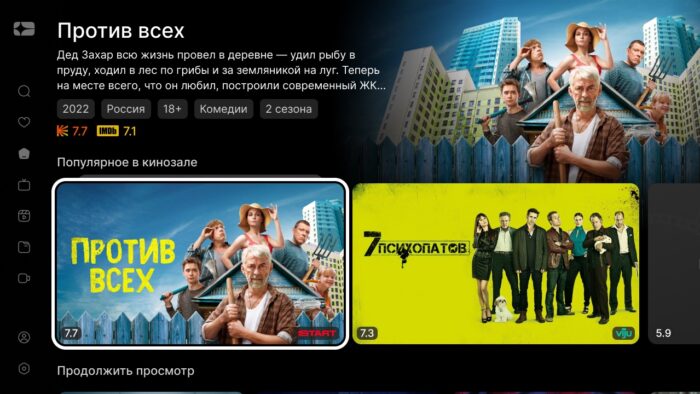
Video library
START moved to new APIs ️
Until the end of the year, the START API that enabled integration in previous releases will be marked as outdated and disabled. In this release, the integration is transferred to the new interface, and therefore we strongly recommend that all operators using START update to it.
In the integration settings after the update, you will need to add the following parameters:
- "Partner catalog API URL"
- “Accessible region”
From a product perspective, the new integration:
- now does not contain the block «Similar » for films;
- has a static list of generated collections: “Premiers”, “New in Subscription”, “Original TV series START”, “Original START films” and “Top 10”.
All changes are reflected in the documentation.
Movie meta
- Added support for a new source of video catalog Poiskkino.
- When importing meth from Kinopoisk and TMDB is now filled with the flag «is a TV series».
- Management team added
video update ratingsto update the ratings of Movie Search and IMDb for films filledkinopoisk_id.
Film categories
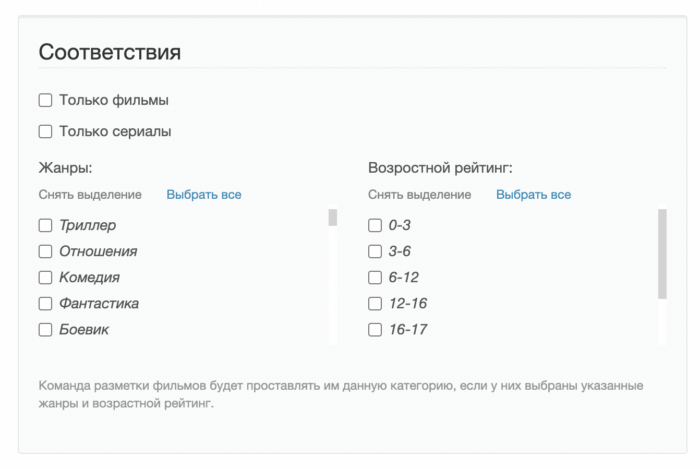
New management team added assign video categories for assigning VOD categories by genre, age rating and flag of seriality to films within the operator catalog — a necessary tool for the new Titanium template catalog screen:
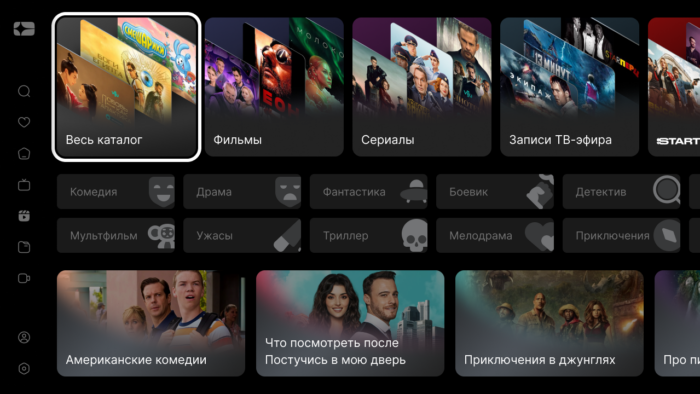
The team with the help of specified matches allows you to distribute films by root categories « Films», « Series», « Children» and other similar, without abandoning the classic filtering by genre.
Other
- Team
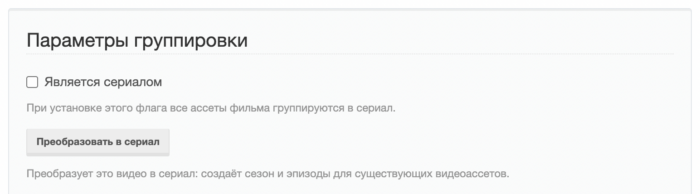
make_vodpvrnow more accurately defines series, if the EPG source does not have special parameters for seasons and episodes: seriality can be set by the names of EPG categories in the optionTVMIDDLEWARE VODPVR SERIES EPG CATEGORIES. Also on the video page added a button "Transform into a series".
- In the form of mass creation of assets, the restriction is set by the option
TVMIDDLEWARE VIDEOFILE CREATE MULTIPLE MAX COUNT(default 100), in the form of mass season creationTVMIDDLEWARE SEASON CREATE MULTIPLE MAX COUNT(by default 1000). - Team
cache_video_country_listoption addedTVMW CACHE VIDEO COUNTRY LIST EXCLUDED COUNTRIESa list of country names that are not cached or returned to interfaces.
🔍 Smart search film
In this release, Smarty has a new microservice smart search base Manticore Search, which allows you to replace the usual search for films by substring in the title with a full-text search for different fields of the film:
- smart search forgives typos (which is especially useful for voice input);
- movies are searched for genres, actors and other meta;
- search results are less likely to yield empty results — more content options are offered to the subscriber;
- smart search faster than usual 🙂
The new search is already integrated into the Titanium interface:
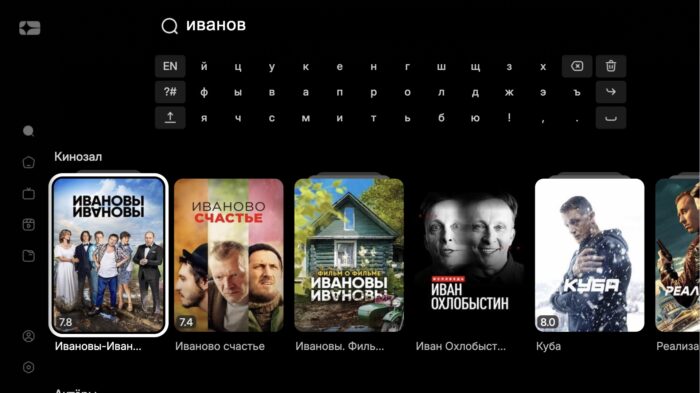
And another interesting feature, created with the help of already existing windyCast microservice: a mechanism for simple and quick authorization of the tv from an already authorized mobile device according to the following scenario:
- subscriber downloads the application to Smart TV;
- at the time of first authorization, the subscriber is shown the ability to log in to a QR code or numerical code through a mobile application or a mobile web version;
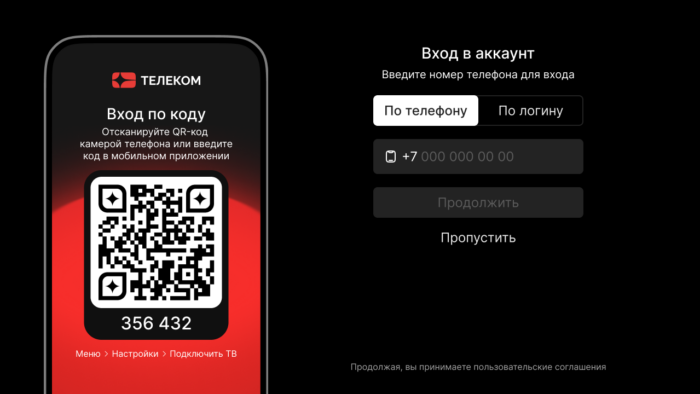
- the subscriber scans the code and the tv automatically logs in to the account in which the subscriber has previously been authorized on the mobile device

At the moment, the mechanism is integrated into the Titanium template and the mobile web version, in future releases we plan to add it to the mobile application and other interfaces on request.
Updates in adminka
- For dashboard tapes with the "Telechannels" type, the "Category TV" and "Display Type" fields are added.
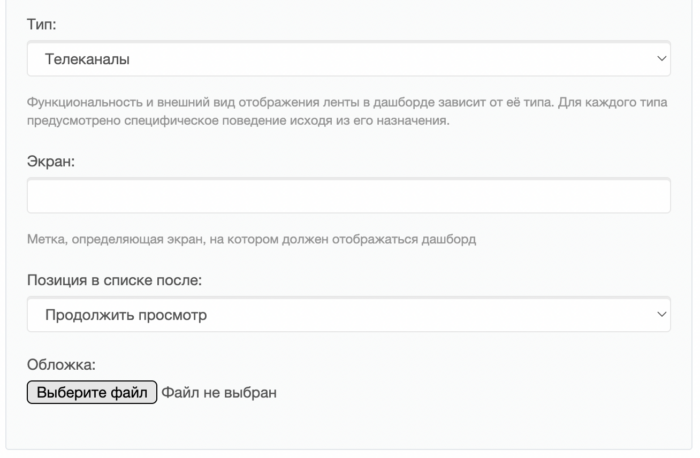
- On the tariff list page, filters are added: only unhidden, only hidden, only archival, only tariffs for inactive accounts, as well as a filter by type of access.
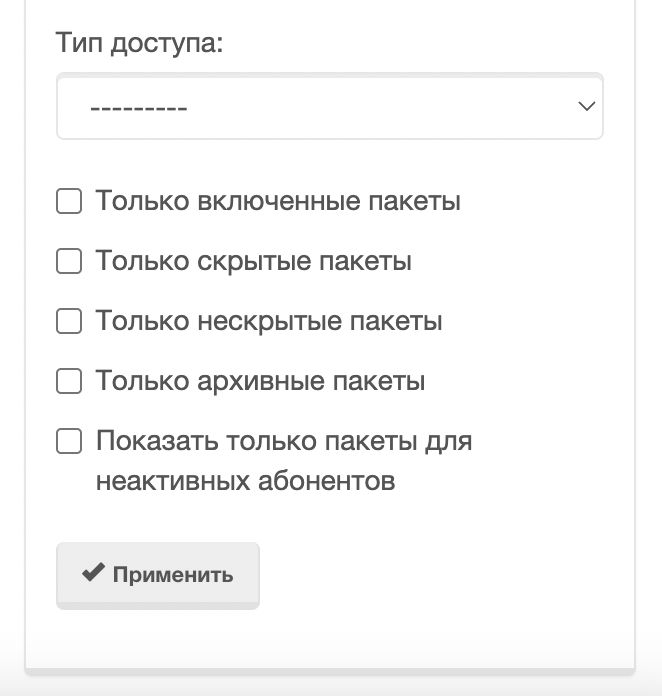
- Reworked widgets in the subscriber dynamics tab:
- “Subscribers Today” widget replaced with “Online Schedule” – the data is filled in by the team
cache_max_online: for a day step 1 hour (maximum online per hour), for a week and a month step 1 day; - payments Today widget shows successful, unsuccessful and unprocessed payments, tied and untied cards, auto payments;
- in the widget "Paying subscribers" added flags "Payments made for the first time" and "Payments "returned" subscribers.".
- “Subscribers Today” widget replaced with “Online Schedule” – the data is filled in by the team
- The report on the actions of the subscriber now takes into account the localization of the admin user, and in the column of the subscriber next to the name it is displayed
id. In the list of actions appeared a separate source “Write-off for activation of account(s)” – for example, when connecting the tariff to an inactive account with subsequent activation. For actions created prior to the update, the source does not change.
- Sorting lists in the adminka equally handles empty values and
NULLpostgreSQL and MySQL: When sorted by ascending, empty values go to the top of the list.
- Added option
TVMW SHOW MESSAGES ON TV- on which system messages to put the flag "On the TV screen": replenishment of the balance, termination of the subscription and manual disconnection of the tariff.
- In the form of a streaming service for the type of routing "Python script" in the list of variables of the field "Script Code" is indicated
authkey- the subscriber authorization key in Smarty. In the script, the variable is substituted in the URL.
New options
- Option
TVMW IGNORE CLEAR SESSION FOR TARIFFSspecifies tariff identifiers for which the Client flag “Clear Sessions When Activating an Account” does not apply.
- Financial transaction limit
TVMW_LIMIT_TRANSACTION_COUNTit can be bypassed for individual IP and subscribers:TVMW LIMIT TRANSACTION IGNORE IPSandTVMW LIMIT TRANSACTION IGNORE CUSTOMERS.
Billing API
- In method
AccountModifycorrected incorrect field processingsubnets. - In response to method
CustomerInfofieldedfirst-name,last nameandmiddlename. - In response to method
AccountInfofieldallowed_device_groups.
TVMW API
- In response to method
NoAuthVideoEpisodeListfieldfileswith a list of episode assets. - In response to methods
PortalDashboardList/NoAuthportalDashboardListfielddescription, in the attributes of the tape - fieldscontent_typeandcategory(Category TV filter for TV channels). Fielddisplaynow it is also coming back for TV channels. - New method added
No AuthProgramListlist of tv programs for a given period of time without authorization. - New method added
NoAuthProgramCategoryChannelList- a list of tv channels with programs in a given category without authorization. - In response to method
ChannelInfoV2fieldmeta. - In response to method
NoAuthportClientChannelListfieldmeta. - In response to method
Customer InfoV2fielderror. Ifemailnot set, the empty line returns. - In response to methods
CategoryList/No AuthCategoryListfielddescription. - New method added
NoAuthPortalDashboardChannelList- a list of channels of the dashboard tape without authorization. - New method added
NoAuthProgramCategoryListlist of transmission categories without authorization. - New method added
SendParentCodeBySmsto send a PIN code to the subscriber via SMS. - In methods
VideoList/No AuthVideoListparametertariffyou can transfer several values through a comma, an input parameter is addedexclude tariff id. Filters are added according to the rating of the film search (kinopoisk rating from,kinopoisk rating to) and IMDb (imdb rating from,imdb rating toto), range 0-10. - In method
ChannelProgramsheadlinedCache-Control. - New method added
GenerateQRLoginto generate a QR session of TV entry. - New method added
SyncQRLoginto complete QR login from an authorized mobile device using digital codelogin code. - In method
ProgramListfieldhas recordit is no longer reset if only part of the channel’s PVR services are in technical work. The depth of the archive is considered by the available PVR services, not by the streamer with the greatest depth if it is not available. - In method
ChannelDetailfieldactionstakes into account the location of the subscriber as well as the list of tariffs inCustomer TariffList. If the tariff in the "Availability Options" is specified country or cityactionsthe channel can only be accessed by geocoincidence. - Methods added
VideoSmartSearch/NoAuthVideoSmartSearchsearch for video through the modulesmart search. - In response to method
Paymentlistfieldis autopaymentflag, whether the transaction is an auto payment0or1). - In method
VideoUrlthe stream address is selected taking into account the availability of the streaming service for the subscriber's device. - In method
SettingsSavefixed the Duplicate entry error while saving the profile settings in parallel.
Content API
- New method added
EPGChannelIconUploadto download EPG channel icons. - New method added
ChannelModifyto edit the channel. - New method added
EPGChannelListto obtain a list of EPG channels. - In method
ChannelCreatefieldmeta.
Other
- In the general Client settings, the default device field is added in the Default Values block.
- On the Client page in the admin next to the option “Check IP address in TVMW API requests with AuthKey” the field “Do not verify IP addresses” is added. In it, through a semicolon, IP is listed, from which the verification is not performed even when the option is turned on.
- Added new EPG parser from VitrinaTV.
- Double balance is corrected if the team
check payment statusand the payment gateway notification processed one transaction at the same time.
